Know what you have, where it is and what happened to it.
Use barcode and QR code scanning with configurable mobile forms to record equipment, stock movements, handovers and condition checks. Keep operational records connected without relying on paper logs or disconnected spreadsheets.
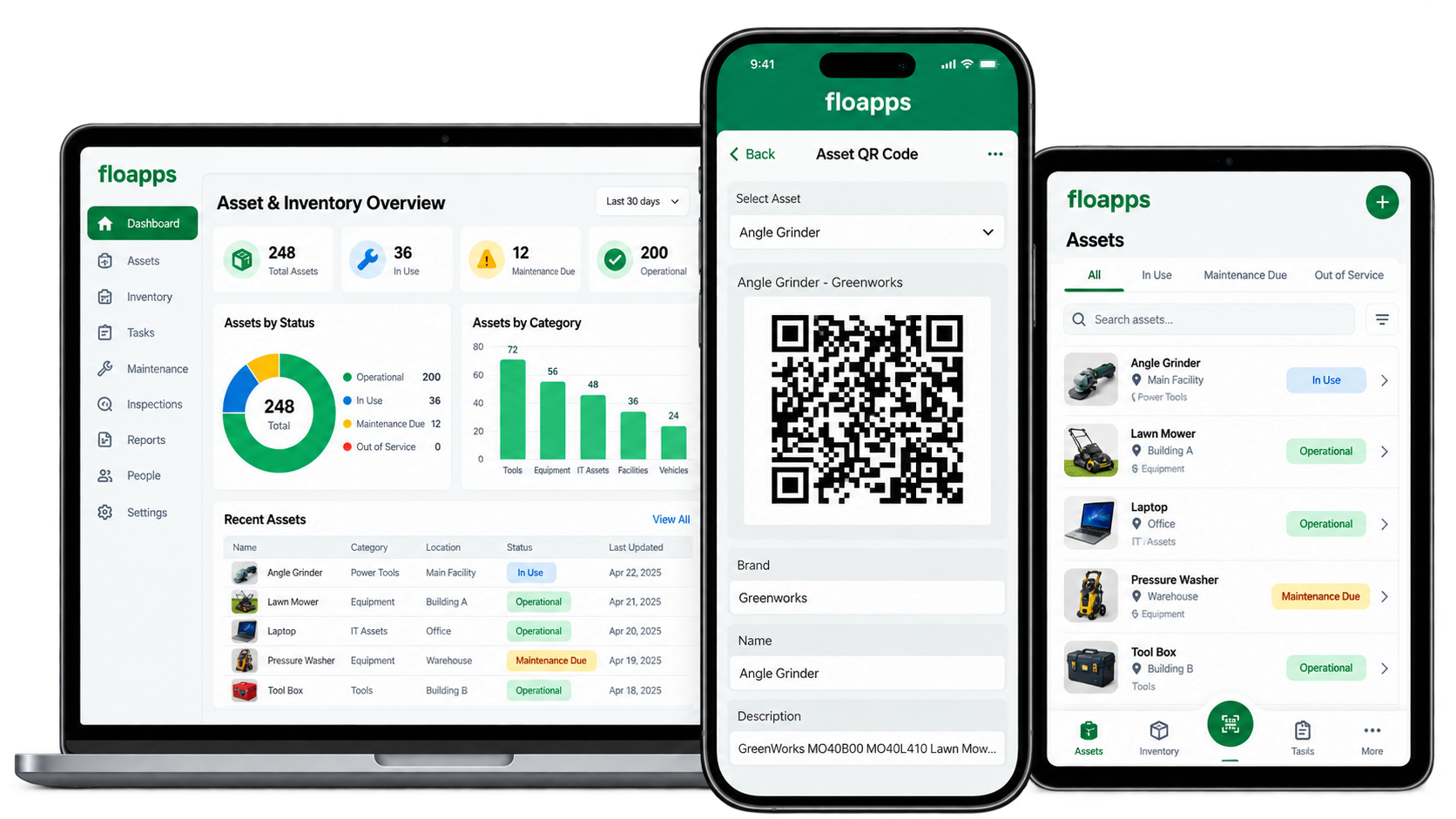
The scan is only the starting point.
Knowing an item exists is not the same as knowing whether it has moved, been issued, returned, damaged or serviced. When details sit in separate spreadsheets and paper records, stock and asset visibility quickly becomes unreliable.
FloApps can connect identification with the action that follows, so a scan leads to a structured record, an update or a request for follow-up.
Scan → identify → record → update
A team member scans an asset or stock item, confirms the relevant details and records a movement, condition check or transaction. The information is saved into the configured register and can support reporting and follow-up.
Scanning and printing new labels are different requirements. We define both during implementation when needed.
From barcode or QR scan to useful operational information.
One example of a workflow that can be configured for an organisation.
01 · Identify
Scan an existing barcode or QR code on an asset, item or location to retrieve the right record.
02 · Check
Confirm the item, its location, assigned person and other relevant details.
03 · Record
Log stock counts, issue or return, transfers, condition checks or maintenance observations.
04 · Update
Save the transaction to the configured FloApps record or synchronised data source.
05 · Follow up
Route discrepancies, damage or requests for replenishment to the responsible team.
06 · Review
Use transaction histories, registers and reports to understand what has moved and what needs attention.
Tracking built around the way your teams work.
The exact features, rules and integrations depend on your inventory and asset processes.
Barcode and QR scanning
Use supported device scanning to identify items without repeatedly typing asset codes. Existing labels can be used when they contain suitable identifiers.
Digital asset registers
Record identifying details, locations, condition, ownership, categories and supporting images.
Stock and movement records
Configure receipt, issue, return, transfers, counts and adjustments to suit your inventory process.
Mobile and offline capture
Collect records in the field, with synchronisation when connectivity becomes available, subject to configuration.
Photos, signatures and GPS
Capture condition evidence and handover details where they add value.
Tasks, alerts and reporting
Configure checks, action follow-up, exceptions and reporting around your operational requirements.
One approach, different operational needs.
Use FloApps to support everyday tracking processes across sites and teams.
Equipment and tools
Assign equipment, record location and condition, and track issue and return.
Products and distributed assets
Identify individual units across customer sites, record servicing and movement, and maintain site-level records.
Stores and spare parts
Scan items during receipt, stock checks and issue, with a consistent transaction history.
Plant and facilities
Support equipment registers, inspections and maintenance requests across locations.
Add operational visibility without assuming you need to replace your ERP.
Many businesses already use an ERP for finance, purchasing or accounting. FloApps can support frontline data capture, identification, inspections and movement records around that system.
Where appropriate, we can assess whether and how data should pass between FloApps and your ERP. Integration, master-record ownership, financial stock control and any replacement of ERP functions must be evaluated separately.
Example: a distributed equipment register
Identify each product or piece of equipment with a unique code, record its customer or site, capture condition checks and service activity, and update its operating record after each visit.
For stores and parts, the workflow could instead focus on goods received, quantities issued, transfers and stock counts.
We make the workflow fit your operation.
Flocrunch works with your team to map item types and IDs, review existing data and labels, define movements and user permissions, build forms, test scanning and reports, and train staff before rollout.
If you need unique codes, barcode labels, printers or ERP integration, we'll scope those separately rather than assume every organisation requires the same setup.
Have a stock or asset problem to solve?
Tell us what you track today, whether you already have labels and what should happen when staff scan an item.
Barcode and QR tracking questions answered.
Can FloApps scan barcodes and QR codes?
Yes. FloApps supports barcode and QR code scanning through compatible devices. Supported formats and the chosen scanning workflow should be checked during setup.
Do we need to replace all our existing labels?
Not necessarily. Existing identifiers and label formats can be assessed first. Unique, reliable item codes are important for accurate tracking.
Can you generate or print unique barcode labels?
We can discuss unique ID assignment and label-generation or printing requirements during scoping. Scanning existing codes and producing new labels are separate workflows, and printing may require a suitable tool or integration.
Can FloApps work alongside our ERP?
Yes, depending on your ERP and its integration options. FloApps can capture operational activity while the ERP continues to handle finance, accounting or stock valuation. Data exchange is scoped separately.
Does scanning automatically update stock?
A scan can identify an item, but the update depends on the workflow you configure. Users may need to confirm a quantity, action or location before submitting.
Can teams work without internet access?
FloApps supports offline data capture. Synchronisation, shared stock availability and conflict handling need planning where multiple users work on the same records.
Make each scan part of a useful workflow.
Start with one asset group or one stock movement process. We'll help you work out the simplest configuration that suits your people and systems.